Chapter 8 · User guide · 1B Recorder
Privacy, lock and backup
Your recordings never leave the phone unless you export them. Here's how they're protected and how to keep a backup.
No Internet permission
1B Recorder doesn't have Android's Internet permission, so it can't send anything anywhere, not even by mistake. Recordings and transcripts are encrypted on the phone with a key kept in Android's secure storage.
Lock the app
In Settings › Security, turn on Lock with fingerprint or screen lock: it asks to unlock after a minute away or when the screen turns off. Recording from the quick setting or the watch keeps working.
Hide from screenshots and recent apps blocks screenshots and screen recording of the app.
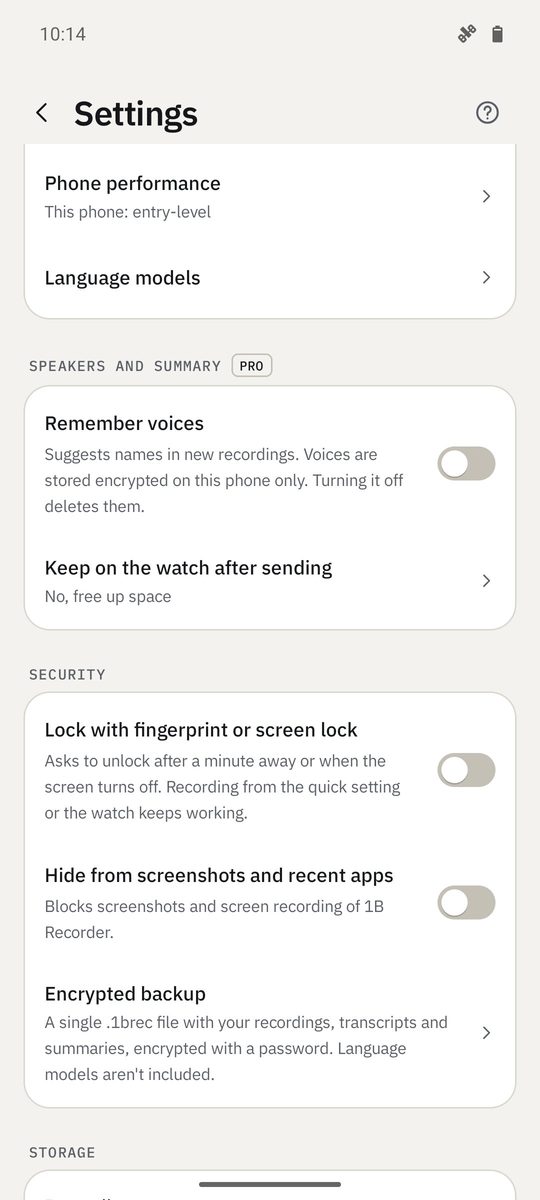
Encrypted backup
- Settings › Security › Encrypted backup › Create backup.
- Choose a Backup password of at least 8 characters and repeat it. Without it the backup can't be opened: nobody can recover it, not even 1Byte Systems.
- Save the .1brec file wherever you like: your computer, a USB stick or your own cloud.
- To recover it on this or another phone, Restore backup and enter the password.
The backup includes recordings, transcripts and summaries, but not the language models: they download again from Google Play.
Remembered voices
Remember voices keeps voice prints encrypted on this phone only, to suggest speaker names. Turning it off deletes them; the names in your recordings stay.
Written for 1B Recorder 1.0 on Android 11 or later, with its Wear OS watch app. Real screenshots with example data.