Chapter 9 · User guide · 1B Recorder
Settings and troubleshooting
Adjust how 1B Recorder records and transcribes, and solve the most common problems.
Recording and transcription
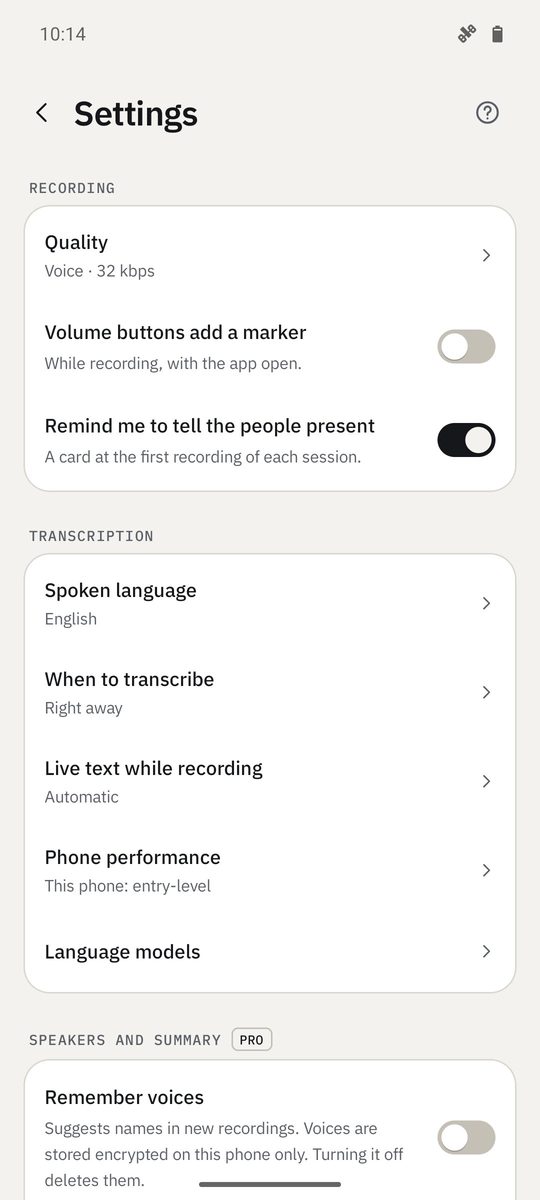
Quality: Voice · 32 kbps (about 10 MB per hour, ideal for speech) or High · 64 kbps (for music or noisy rooms).
Live text while recording: Automatic, Always or Never. Phone performance decides which models are used; it's measured on the phone, but you can force it.
Appearance and language
Theme (Same as the phone, Light or Dark), Reduce motion, Haptic feedback and App language, in 21 languages.
1B Recorder Pro
Pro adds speakers, summaries and tasks, the watch app, and DOCX and PDF export. It's a one-time purchase on Google Play, with no account and no subscription. Settings › See Pro shows it; Restore purchase brings it back on a new phone with the same Google account.
Help
Settings › Help opens this guide in your browser, in the app's language. The ? at the top of Settings, Language models and Dictation opens the chapter that explains it.
Problems and solutions
“English model missing”
That recording's language has no model yet. Open Language models at the top of the library and download it; the recording is transcribed by itself when it's ready.
A recording says On hold · the phone is warm
Transcribing is demanding, so 1B Recorder waits for the phone to cool down and carries on by itself. Nothing is lost.
“Another app is using the microphone. What was recorded has been saved.”
Another app (a call, a voice assistant) took the microphone. What was recorded until then is saved. Close the other app and record again.
“Not enough free memory for the summary. Close other apps and try again.”
The summary model needs free memory. Close other apps and try again, or choose Fast.
“1B Recorder can't read this file. Try an audio or video file.”
The file isn't an audio or video format the phone can read. Convert it to M4A, MP3 or WAV and import it again.
“Wrong password, or this file isn't a 1B Recorder backup.”
The password doesn't match the one used to create the backup, or the file isn't a 1B Recorder backup. Passwords are case-sensitive.
Written for 1B Recorder 1.0 on Android 11 or later, with its Wear OS watch app. Real screenshots with example data.