Chapter 8 · Guide · 1B Docs
Share, print, export to PDF and compatible formats
When a document is ready, share it, print it or turn it into a PDF from the ⋮ menu.
Export to PDF
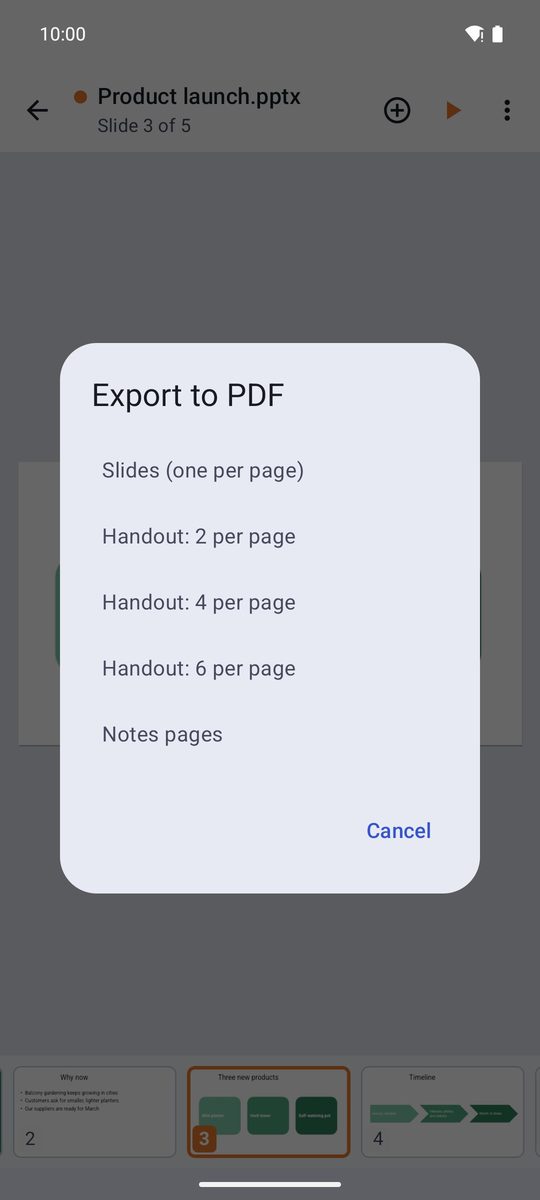
- Open the document and tap ⋮ › Export to PDF.
- In presentations you choose how: Slides (one per page), handouts with 2, 4 or 6 per page, or Notes pages.
- Choose the folder and the name: the PDF keeps text and drawings sharp, ready to send or print.
Print opens Android's printing screen: choose a printer on your network or Save as PDF. Presentations propose landscape paper automatically.
Compatible formats
Texts: DOCX, DOCM, DOTX are opened and saved as they are; ODT, RTF and HTML are saved as a DOCX copy; DOC (Word 97-2003) is read-only.
Spreadsheets: XLSX, XLSM, XLTX and CSV/TSV are opened and saved as they are; XLS and ODS open as a copy that is saved as XLSX.
Presentations: PPTX, PPTM, PPSX and POTX are opened and saved as they are; PPT and ODP open converted and are saved as a PPTX copy.
Also PDF (with every tool in this guide) and plain text: TXT, Markdown, CSV, JSON, XML, YAML, logs and code.
Saving never throws away what the app doesn't understand: the rest of the file (macros, charts, extra parts) is kept as it was.
Written for 1B Docs 1.0 on Android 8 or later, with real screenshots and invented example documents.