Chapter 4 · 1B Desk guide
Clipboard and files between computers
During a session, what you copy on one computer can be pasted on the other, and files travel in both directions, end-to-end encrypted.
Copy and paste
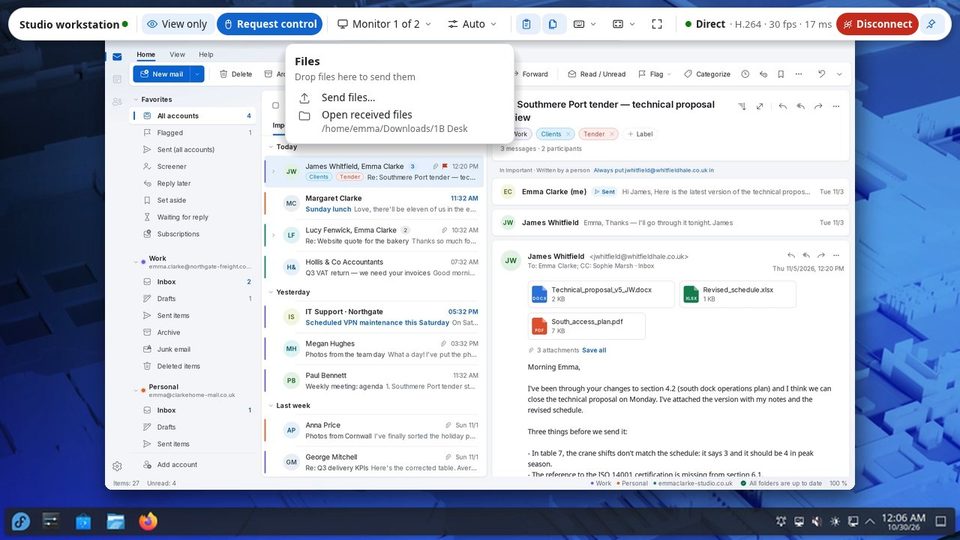
When you have control, copied text goes both ways while the session is open. The clipboard button on the toolbar turns it off and on (Clipboard sync off / Clipboard sync on).
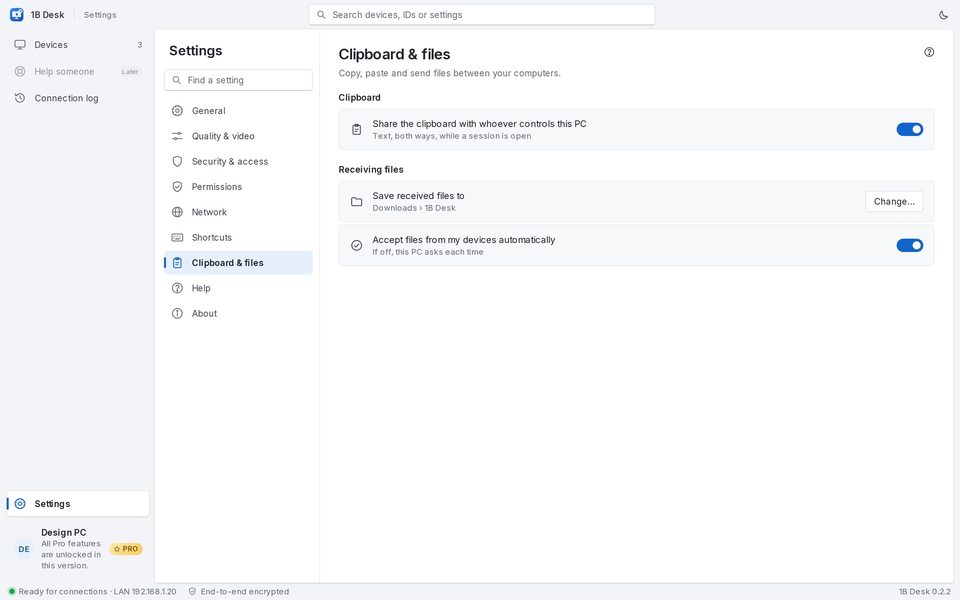
On the PC being controlled, Settings › Clipboard & files › Share the clipboard with whoever controls this PC decides whether it's allowed at all.
Send files
- Drag files from your computer onto the session window (Drop files here to send them), or open the Files menu and choose Send files….
- The toolbar shows the progress. On the other PC the files go to the folder set in Save received files to (by default Downloads › 1B Desk).
- Files sent to you arrive in the same way: Open received files in the Files menu opens the folder.
With view only you can't send files: ask for control first.
Receiving files
Accept files from my devices automatically saves files from your paired devices without asking; turn it off to be asked every time. Change… picks another folder.
For 1B Desk 0.2 on Windows and Linux, and the Android viewer.