Chapter 8 · 1B Desk guide
Troubleshooting: common problems and their solutions
Most problems come from the network or from a permission on the other PC. Find the message you see below; the texts in bold are the ones in the app.
Check this first
1B Desk is open (or running in the tray) on both computers, both are on the same network, and both have the same version: update the older one if they don't. For now, connections work within your own network.
Problems and solutions
A device doesn't appear under Nearby
Check that both computers are on the same network and that Show this PC under Nearby on other devices is on in Network. Guest Wi-Fi and some routers stop devices from seeing each other: type the 8-digit code and, if needed, the address with Use an IP address.
“That code didn't work”
Check the 8 digits on the other computer. The code changes after every pairing and after five wrong tries, and lasts 10 minutes: use the one on the screen right now.
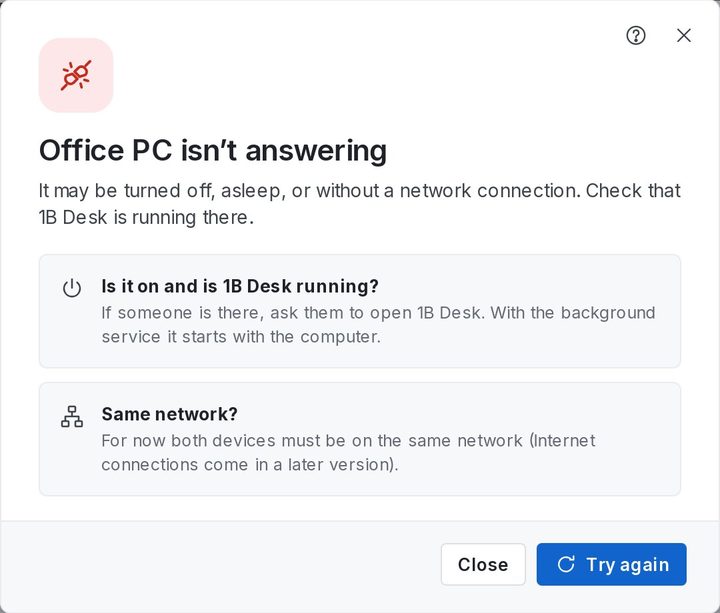
“Office PC isn’t answering”
The other computer may be off, asleep or on another network. Ask whoever is there to open 1B Desk; with the background service it starts with the computer.
“The versions don’t match”
Update 1B Desk on both computers: Settings › About › Check for updates.
“Connected to Office PC, but the picture didn’t arrive”
The connection worked but no image arrived within 20 seconds. Try again; if it keeps happening, restart 1B Desk on the other computer.
“Someone must allow screen sharing on the other PC”
On GNOME and some Linux desktops the first session needs someone at the other PC to accept screen sharing. On KDE Plasma, click Allow without asking in Permissions so nobody has to click again.
The screen goes black at an administrator prompt or the lock screen
On Windows, these secure screens need the 1B Desk background service. Check Permissions on the other PC; if it says Running without the service, reinstall 1B Desk.
A key seems stuck
Open the Keyboard menu and choose Release all keys.
“The session window closed unexpectedly”
It's often the graphics driver of your PC. Try again; if it keeps happening, update the graphics driver.
“Office PC doesn’t know this PC anymore”
This PC was removed on the other computer. Pair again with its code.
No icon next to the clock on Linux
Your desktop needs the libayatana-appindicator package; 1B Desk tells you which command to use in General. Until then, closing the window minimizes it so it keeps receiving connections.
For 1B Desk 0.2 on Windows and Linux, and the Android viewer.