Chapter 2 · 1B Talk guide
Channels and direct messages
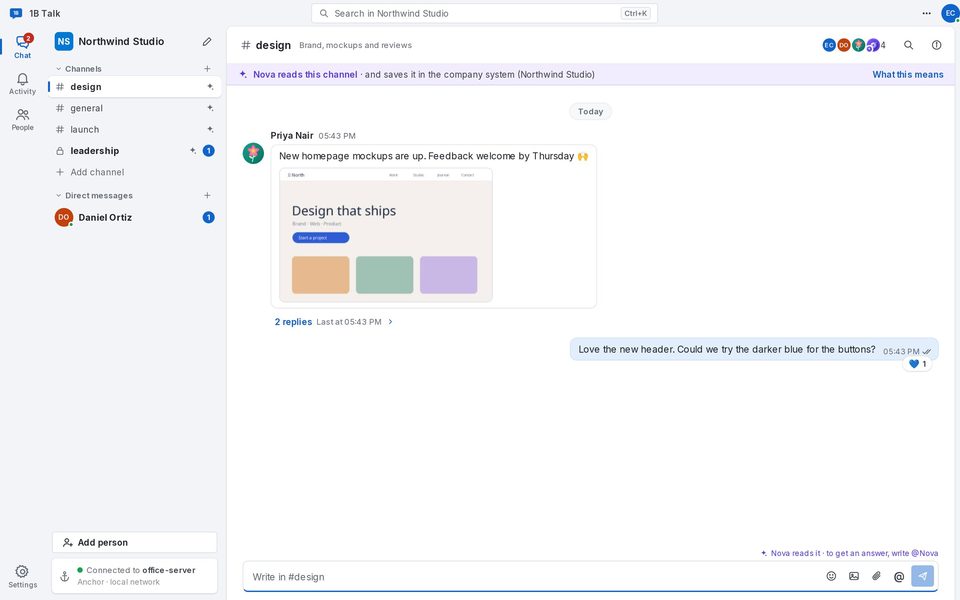
On the left, the bar with Chat, Activity and People; next to it, your channels and direct messages; in the middle, the conversation.
The main window
Channels are conversations for a topic or a project. Direct messages are one-to-one. A number next to a channel means unread messages; bold means something new.
At the bottom of the list, the card of the anchor tells you whether you are Connected to your company. If the connection drops you can keep writing: messages go out when it's back.
Create a channel
In a channel's menu (More) you can Mute it, Rename it, Archive it or Leave channel. Archived channels keep everything and an admin can Reopen them. Drag channels to put them in the order you like.
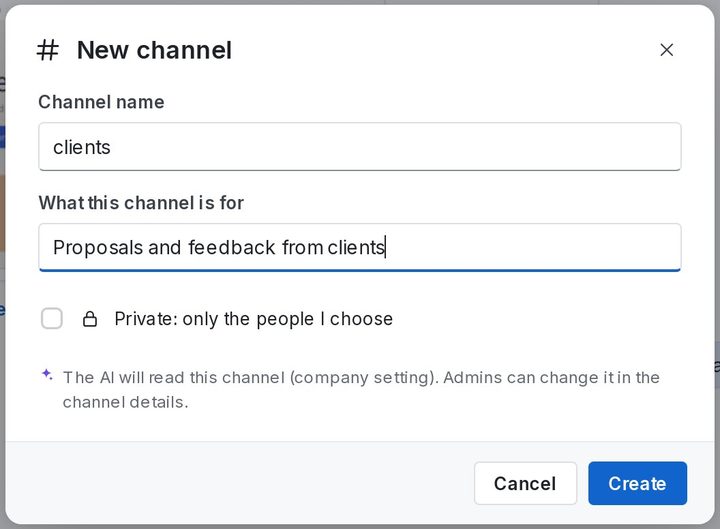
- Click + next to Channels, or Add channel at the end of the list.
- Type the Channel name and, if you like, What this channel is for.
- Leave it public (everyone in the company is in it) or tick Private: only the people I choose and pick the people.
- Click Create.
Direct messages and Activity
To write to one person, click New message and choose them, or open People and click Send a message. Direct messages between people are always private: the AI never reads them.
Activity gathers your Mentions and replies to your threads, so you can catch up without opening every channel.
For 1B Talk 0.3.10 on Windows and Linux.