Chapter 5 · 1B Calendar guide
Connect CalDAV servers and subscribe to .ics links
CalDAV is the open standard that many services and home servers use for calendars. An .ics link is a read-only calendar someone publishes: holidays, a league, timetables.
Add a CalDAV server
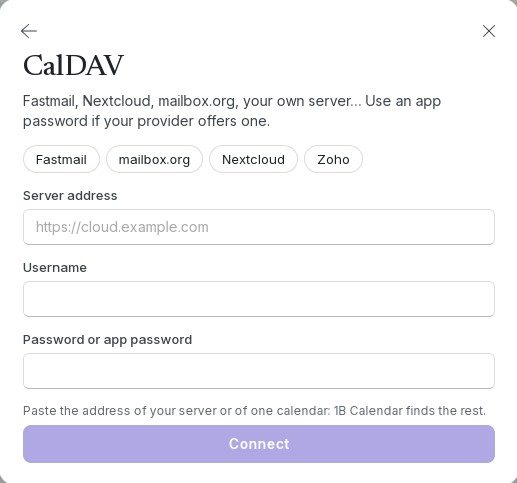
- Click Connect calendars › CalDAV.
- In Server address, paste the address of your server or of one calendar (for example https://cloud.example.com). 1B Calendar finds the rest.
- Type your Username and, in Password or app password, an app password if your provider offers one (Fastmail and Nextcloud do).
- Click Connect. The app finds every calendar in the account and syncs them both ways.
Subscribe to a link (.ics)
- Copy the calendar's link: it starts with https:// or webcal:// and often ends in .ics.
- Click Connect calendars › Subscribe to a link and paste it in Link. You can give it a name in Name (optional).
- Click Subscribe. The calendar appears under Subscriptions; it's read-only and refreshes on its own with every sync.
Proton Calendar: in Proton, Settings › Calendars › Share › Share with anyone (link), and paste that link here.

A calendar only on this computer
Connect calendars › Only on this computer creates a calendar that never leaves your computer: it works offline and needs no account. Type a Calendar name and click Create.
Problems and solutions
“That address doesn’t answer as a CalDAV server.”
Check the address, or ask your provider for its CalDAV address (Nextcloud: the address of your cloud; Fastmail: the one in its help pages).
“The server rejected the username or password.”
Check both. If your provider offers app passwords, create one and use it instead of your normal password.
My server rejects the password even though it's right
Servers that only accept Digest sign-in (Baïkal's default setting) aren't supported yet. If you manage the server, switch it to Basic authentication over HTTPS.
“That link isn’t a calendar (.ics).”
The link opens a web page, not a calendar file. Look for the link that says iCal, .ics or “subscribe”.
For 1B Calendar 0.1.1 on Windows and Linux.