Chapter 3 · 1B Calendar guide
Connect Microsoft 365, Outlook.com and Hotmail to 1B Calendar
Works with Outlook.com, Hotmail and work or school accounts (Microsoft 365). You sign in on Microsoft's page, in your browser.
Sign in with Microsoft
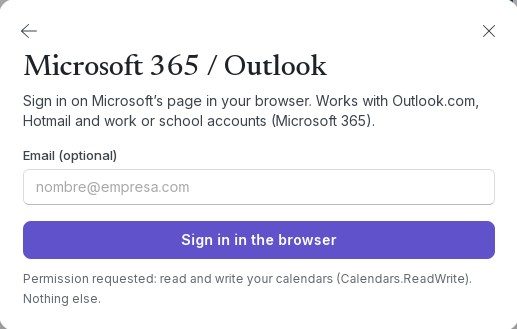
- Click Connect calendars › Microsoft 365 / Outlook.
- If you like, type your address in Email (optional).
- Click Sign in in the browser and sign in on Microsoft's page.
- Accept the permission it asks for. When the browser says you can go back, close the tab: the app shows Connected.
Work and school accounts
Some organisations only let you use apps their IT department has approved. Then 1B Calendar says Your organisation must approve 1B Calendar first. Send this link to your IT administrator.
Click Copy the link for your administrator and send it to them. Once they approve it, sign in again.
Repeating events in Microsoft 365
In Microsoft 365 accounts, changing a whole series (All events) changes its title, place, notes and reminder for now. To change the times or the repeat rule of the whole series, use Outlook; single days can be changed in 1B Calendar.
Problems and solutions
“The browser took too long.”
Try again and finish signing in in the tab that opens.
“Signed in, but there are no event calendars in that account.”
The account you signed in with has no calendar (some work accounts only have email). Check that it's the right account.
For 1B Calendar 0.1.1 on Windows and Linux.