Chapter 1 · User guide · 1B Note
Getting started with 1B Note
Install 1B Note, choose whether to start on this computer or connect to a server, and keep the recovery phrase that protects your notes.
Install 1B Note
On Windows, run the installer: it installs for your user, without asking for an administrator. On Linux there are RPM, DEB, Flatpak and AppImage packages; it's the same app on GNOME and KDE Plasma.
1B Note keeps everything on the computer, so it opens and works without a connection. It checks once a day for a new version signed by 1Byte Systems; chapter 9 explains how updates work.
The first screen
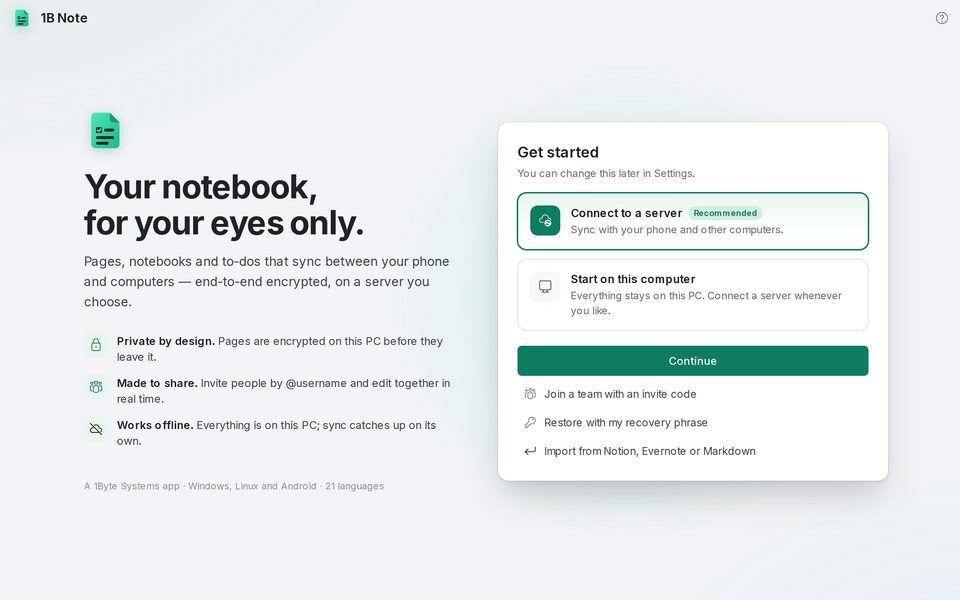
The first time, 1B Note asks how you want to start. Both options can be changed later in Settings.
- Choose Start on this computer if you just want to write: everything stays on this PC and you can connect a server whenever you like.
- Choose Connect to a server if you already use 1B Note on another device or have a 1B Note server (yours, at home or at work). Chapter 6 explains it step by step.
- Press Continue. Below there are three shortcuts: Join a team with an invite code, Restore with my recovery phrase and Import from Notion, Evernote or Markdown.
A quick look around
On the left, the sidebar: Search, Home, Inbox and Shared with me, then your Favorites, Notebooks, Teams and Tags. At the bottom, Trash, Settings and a card with your name and the sync status.
Home shows the pages you visited recently, your favourites and the reminders that are Coming up. Ctrl+\ hides and shows the sidebar.
Your recovery phrase
When you create an account on a server, 1B Note shows Save your recovery phrase: 8 groups of letters and digits. It's the only way back into your notes if you lose every device, because nobody else has your keys, not even the server.
Write it down or keep it in a password manager such as 1B Pass, away from the devices where you use 1B Note, and press I've saved it.
You can check it or create a new one at any time in Settings › Account › Recovery phrase.
Written for 1B Note 0.9 on Windows and Linux, with notes for 1B Note on Android. Real screenshots with example data.