Chapter 9 · Guide · 1B Files
Common problems and solutions
When something fails, 1B Files tells you what happened. These are the most common cases and what to do.
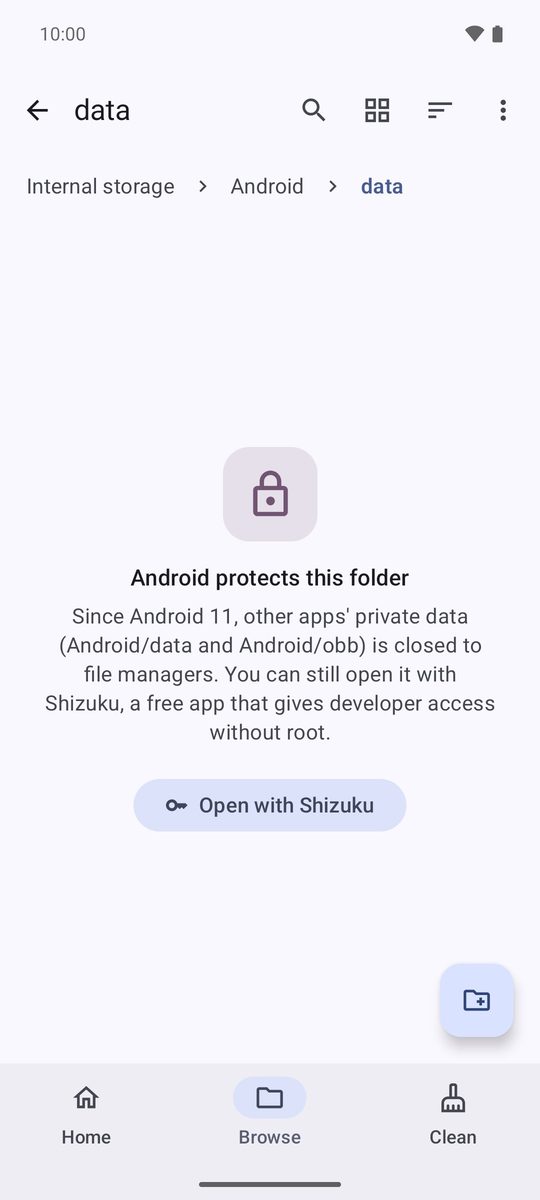
Android/data and Android/obb
Since Android 11, the private folders of other apps are closed to every file manager, and 1B Files shows Android protects this folder. If you really need to get in (for example, to copy a game's saved files), tap Open with Shizuku: Shizuku is an open-source app that gives developer access without root, and the app guides you step by step.
Apps keep their data here: deleting or changing files can break them.
Problems and solutions
1B Files keeps asking for access to my files
Android has to allow “access to all files”. Tap Grant access, find 1B Files in the list and turn on the switch. On some phones it's in Settings › Apps › Special app access › All files access.
My SD card or USB drive doesn't appear
Connect it and wait a moment: it appears on the home screen and in Browse as soon as Android mounts it. If it doesn't, check in the phone's storage settings that it's mounted and not set up as internal storage.
I deleted something by mistake
Open the Trash tile, tap ⋮ next to the file and Restore: it goes back to where it was. What you delete on a server, in the safe folder or with the trash turned off can't be recovered.
Cleaning didn't free up the space I expected
Files in the trash still take up space until it's emptied. Tap Empty in the trash, or wait: it empties itself after the days set in settings.
The computer can't open the address
Both devices must be on the same Wi-Fi (guest networks usually keep devices apart). Type the address exactly as shown, with http:// and the port, and check that access is still on. If the Wi-Fi changed, access turned off: turn it on again, because the address and the PIN may change.
“Wrong username or password. Check them in the server settings.”
Check the username and password in the server settings (⋮ › Edit). For SMB on Windows, the username may need the domain or computer name in front (DOMAIN\user).
“The server can't be reached from this network. Check that you're on the same network or VPN.”
The phone must be on the same network as the server, or connected to it by VPN. Check the address and the port, and that the service (SSH, FTP, Samba…) is running.
“Password-protected RAR5 archives can't be opened yet (RAR4 with a password can).”
Password-protected RAR5 archives can't be opened yet. Extract it on a computer, or ask for it as a ZIP or 7z.
“Encryption key reset” in the safe folder
Android deletes the safe folder's key when you remove the phone's screen lock. Files encrypted with the old key can't be recovered; new files use a new key. Keep the screen lock while you use the safe folder.
I'm changing phones
Copy your files to the computer with access from PC, or to a server. Take everything out of the safe folder first (Take out all), because it isn't included in backups.
Written for 1B Files 1.0 on Android 11 or later, with real screenshots and example files.